Konnwei OBD2 Scanner
Orange KW901
Sale price
$23.99
Regular price
$39.99
Skip to product information


Konnwei OBD2 Scanner
Sale price
$23.99
Regular price
$39.99
Know What Your Check Engine Light Means in Seconds
Skip the guessing and the shop diagnostic fee. Plug the KONNWEI KW901 into your car's OBD2 port, connect it to your phone, and read and clear check-engine codes yourself.
- Works with iPhone and Android: connects over Bluetooth 5.0 for a fast, stable link.
- Read and clear codes: find out what's wrong before you pay a mechanic.
- Universal fit: works with all OBD-II compliant vehicles, including most 1996 and newer US cars and trucks.
- Compact plug-in design: small enough to leave in your glovebox.
- Software updates included: supports free updates and multiple languages, with English by default.
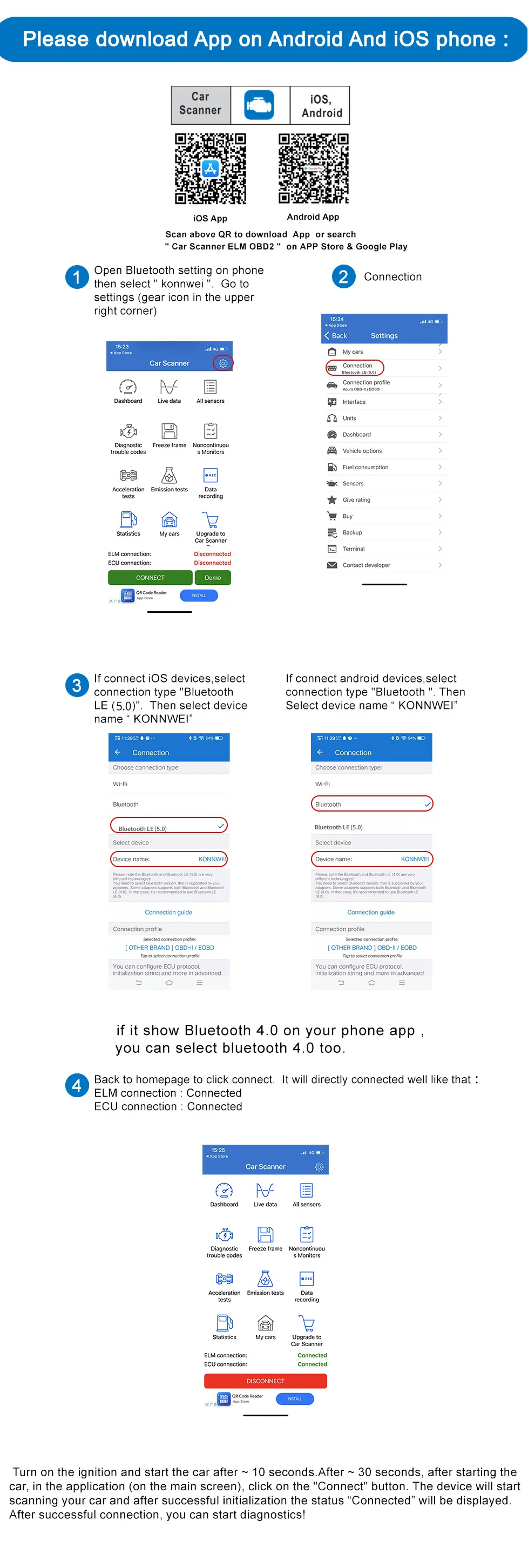
How to connect (important for iPhone)
Don't pair it in your phone's Bluetooth settings. Pair it inside the app instead.
- Plug the KW901 into your car's OBD2 port, which is usually under the dashboard by the steering wheel.
- Turn on your phone's Bluetooth.
- Open an OBD2 app such as OBD Auto Doctor and go to Extras, then Connectivity, then Bluetooth.
- Under Device, choose "Konnwei" and connect.
- Go back to the home screen, tap the connect icon in the top right, and wait about 10 seconds.
Specs
- Model: KONNWEI KW901
- Chip: ELM327 V1.5
- Connection: Bluetooth 5.0
- Compatibility: OBD-II compliant vehicles
- Certifications: CE, FCC, RoHS
- Battery: none, powered by your car
Make every drive better with Roadform.